“Electronics for Kids”

I haven’t read the book myself (yet), so this is going to e a book review of a book review, but I very much enjoyed Max Maxfield’s recent article on Electronics for Kids by Oyvind Nydal Dahl.

The book is described by its publisher as a work that “demystifies electricity witelectronics-for-kidsh a collection of awesome hands-on projects.” Those hands-on projects – 23 in all – are, of course, the key to engaging kids, as most 10 year olds don’t want to read a book that’s all theory. It sounds like it gets kids into things gradually, starting with a simple project (turning a lemon into a battery rather than into lemonade), then moving onto more complex tasks like creating an alarm clock that goes off at sunrise.  It also takes kids into the realm of digital electronics, with projects like one for making an electronic coin flipper. (Logic gates and flip-flops made easy!)

Max notes that the book includes parts lists, detailed instructions, and “super-clear” illustrations (diagrams, photos). He also liked that the book includes troubleshooting info for each project, so that kids (and parents) can easily figure out what went wrong, rather than just throwing up their hands in frustration. (Not that the throwing up of hands in frustration ever happened to me when working on a project, on my own or with my kids.)

I’m a “tweener” here. My kids are, respectively, in the work force, in graduate school, and in college. And there are no grandkids in sight just yet. But I do have a nephew who might find this fun. (Beyond kids, Max writes that it would be a fun guide for an electronics novice of any age who wants “to dip their toes in the electronics waters but has no prior knowledge or background in this area.”)

Anyway, it feels a bit odd to be recommending a book that I haven’t (yet) read, this one sounds like a good one.

I especially like that Electronics for Kids will take its kids behind the scenes. With all the technology that kids are exposed to from such a young age, it’s almost a given that they’ll grow up as savvy tech users. This book will help them understand what’s actually going on with all the toys, games, tablets, and phones they’ve got their hands on. It may even inspire some to grow up to be savvy tech makers. Here’s hoping!
 

GM’s Latest Recall

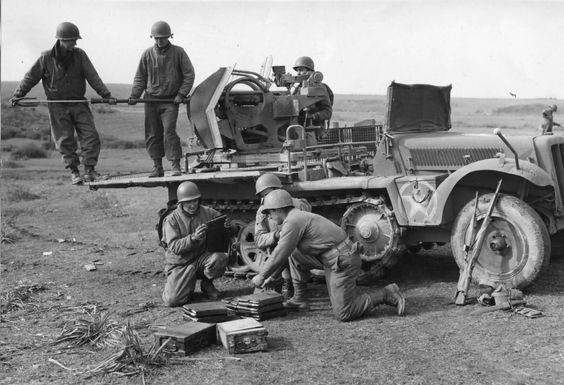
Many years ago, I was watching a documentary on World War II, specifically on the American GI’s involved in the Normandy invasion and the campaign that followed. One of the things that was pointed out was the ability of American soldiers to keep their jeeps and tanks up and running. Boys who were used to tinkering with a jalopy, or fixing a broken down tractor, were able to make fixes on the fly by getting under the hood, figuring out workarounds and improvisations, and, when they had to, taking parts out of abandoned equipment that was even more damaged than theirs.

Given the sophistication of today’s vehicles, in which the mechanical has been replaced by the electronic, it’s less likely to see how these “Yankee ingenuity” scenarios could play out on today’s battlefield. While I’m quite sure that our military is just as ingenious as they’ve always been, these days, there are a lot more parts, a lot more things that can go wrong, and a lot more technical sophistication.gis-wwii

This all came to mind as I was reading an article on EE Times last week in which Junko Yoshida reported on a GM recall of nearly 4.3 million vehicles prompted by a software problem they found in their air bags.

In making their announcement, GM wrote, “The sensing and diagnostic module that controls air bag deployment has a software defect that may prevent the deployment of frontal air bags in certain ‘rare circumstances.’”

As described by the U.S. National Highway Traffic Safety Administration, “’in the affected vehicles, certain driving conditions may cause the air bag sensing and diagnostic module (SDM) software to activate a diagnostic test’ that would prevent the air bag from deployment in the event of a crash.”

What’s so interesting here is that we’re talking about software, not something that those WWII-era tinkerers had even heard of, and not something that today’s tinkerers – the folks who still like to lift up the hood and get their hands a bit dirty – have much control over.

GM and its suppliers have, of course, extensive testing. But we all know that it’s highly unlikely to uncover every possible flaw, no matter how rigorous the testing is.  And given the level of complexity of today’s vehicles – there may be upwards of 100 ECU’s embedded within. That’s a lot of code, from a lot of different vendors, to worry about.

And as vehicles become more and more sophisticated, those lines of code will continue to grow.

Interesting to think about, especially if you recall how important it was to the war effort during World War II that so many GI’s had experience making mechanical fixes. Things sure have changed.

————————————————————————————————————————————–
Someone with an eagle eye may recognize that this is not a Jeep those GI’s are tinkering with. It’s a German anti-aircraft gun that they’re trying to figure out how to use!

Thinking outside the data sheet

In Critical Link’s inaugural blog post, way back in February 2013, our topic was “Is DSP Dead?” (By the way, the answer was and is, “No, it isn’t.”) In that post, we gave a shout out to Gene Frantz, the father of DSP, on the occasion of his retirement from TI.  While Gene retired from TI, he didn’t retire-retire. I met with him recently at his new company, Octavo Systems, and he mentioned a paper he had written, along with Chau Mai and Ivan Garcia, nearly a decade ago. Published by and still available from TI, Push Performance and Power Beyond the Data Sheet addressed the “need to find new ways to satisfy our continuing demand for more performance and to achieve that performance at a lower power level.”

Three years later, EE Times revisited the paper in a two part article.  Part One gives a quick overview of the paper, noting that it covers how developers can boldly go beyond the specifications that are promised in an IC data sheet to get the performance and power you need for your products. In Part Two, Gene and Ivan expand on their original work.

With the caveat that, once you do go beyond what’s vouched for in the IC manufacturer’s spec, the warranty no longer applies, Gene and Ivan go into quite a bit of detail on how to go about things.

Using Gene’s baby, a DSP, as their IC example, the key points covered include:

  • Clock speed:  Look at the fine points of those specs to figure out where there’s some play with respect to your specific application. The example they use is that if a “device is rated to run for a case temperature as high as 85ºC at, say, 1.2 V, the manufacturer must rate this device to run at 360 MHz at most.” But if you app doesn’t need to work at temps above 25ºC, you can boost the clockspeed to nearly 500 MHz.
  • Tweaking the performance, power budget:  While you always need to account for the worst case scenario, i.e., max power consumption, Gene and Ivan suggest playing with other conditions. Rather than design for worst case across all conditions, there may be ways you can juggle things (e.g., going with a lower voltage requirement) to meet your needs without blowing your power budget.
  • Performance vs. reliability: Exercise judgement and caution here, and seriously manage temperature and operating voltage limits so that you won’t be damaging the device. That said, there may be tradeoffs you want to take, upping the performance while accepting a failure rate that you can live with.

Gene and Ivan also cover design considerations, and end by emphasizing the importance of assessing the risk associated with each tradeoff you make.

That said,  sometimes to hit the requirements you need, you just have to think outside the data sheet.

Vintage lectures on transistors

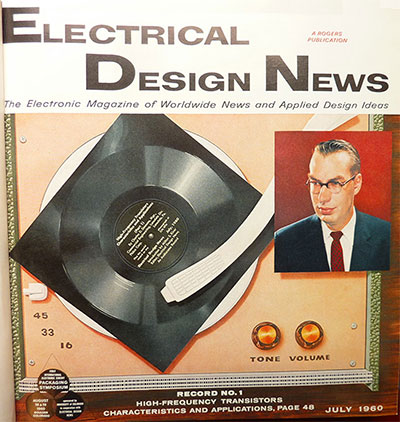
edn-july-1960_400Thought I’d do one more post – maybe I should make that one more for now – based on the looks back in time that EDN has been doing on the occasion of its 60th anniversary.  This one is based on an article by Martin Rowe, in which he went back through the EDN archives – back to the days when it was Electrical Design News – and unearthed some editions in which the magazine added audio.
Today, we have such instant access to information. Anything we want to know about is pretty much at our fingertips. Actually, it may not even requirie fingertips, given that we can just ask Siri or Cortana to find something for us. And all that information is available in formats that include video. So it’s sometimes hard to appreciate that there was a time when the way engineers learned about new technology was through magazines, books, and conference papers. Not that we still don’t learn that way, it’s just that today there are so many more sources of info – some good, some bad, for plenty of it out there. I just went ahead and googled “how to design an embedded system” and got back nearly 9 million results. I didn’t look through them all, but I already know that that’s a lot of information at your fingertips, or at the tip of your tongue. And much of it’s on YouTube.

As for EDN back in 1960:

The July through October issues contained phonograph records, “an historic first in published communication,” each with an audio lecture for the article.

The audio lectures (and written articles) were the work of a Philco engineer, from back when Philco was a big deal in electronics, and are based on information specific to Philco transistors. In effect, a non-paid for advertorial, but likely not regarded in such a way at that point in time. Instead, it was likely seen as a cutting edge way to provide up to date information on an emerging technology.

The topics covered are:

  • High-Frequency Transistors and Their Figures Of Merit
  • Optimum Design of Transistor Communications Circuits
  • High-Speed Switching Transistors
  • Transistorized Video Amplifiers

In addition to the audio recordings, Rowe’s article includes thumbnails of the articles themselves (complete with schematics and graphs).

If there’s one thing that hasn’t changed about engineers over time, it’s that we’re always curious about “stuff”, so I went ahead and listened to one of the lectures. Kind of fun to listen to all those snaps, crackles, and pops.

I hope you enjoy it as much as I did.

Before My Time, Part Two

Last week, I blogged about some technology news from in the 1950’s. That post was based on an article by Steve Taranovich that appeared on EDN a couple of weeks back, as the magazine celebrates its 60th anniversary. This week will be a second take on Steve’s article, this time taking a look at the “electronics developments and ideas from technical white papers from that era”. The papers cited, which include technical diagrams (mostly hand-drawn) that are worth looking at, were all published in 1956. The technologies covered in these papers include:

  • A sideband-mixing superheterodyne receiver: While superheterodyne receivers had already been in a use for a couple of decades, by the 1950’s, “radio users wanted microwave receivers with bandwidths in the 100s of Megacycles (modern-day MegaHertz), which approached the sensitivities of the superheterodyne receiver.” The paper Steve looked at described a way to achieve this through a sideband mixing system that used “two local oscillators (LO), a microwave, and a VHF combination whose signals were injected on a crystal, producing the outcome of an infinite set of virtual LO signals These LO signals were centered around the microwave LO frequency and were separated from each other by the frequency of the VHF LO. The low-level received signal would mix with one of the virtual LOs producing the desired IF signal.” It worked, demonstrating that “this multiple mixing technique could be implemented when RF coverage needs to dictate receiver BWs far larger than the spectral width of the expected signals.”
  • A new numerical indicator tube, Nixie: This one might have made the list based on the fun name alone, but, back in 1956, when Burroughs brought it to market, the Nixie tube was an important development. “The Nixie was a 10 digit gas indicator tube that gave a two-dimensional in-line readout that was readable from a wide viewing angle.” It was less expensive than the incandescent indicator and lasted better (and more predictably) than electroluminescent numbers. So the Nixie tube won out. Fast forward to today’s technology, and, while nixie tubes are still used (largely in the “maker” world), Nixie is more likely to evoke thoughts of the wearable, flyable camera – or will be once, that Nixie comes to market.
  • The NY Empire State Building beacons: In 1956, the Empire State Building was already 25 years old, and it was still the world’s tallest building. To top it off, in 1956, they added new beacons “that generated a total of nearly two billion candlepower. At the time they were capable of providing the world’s brightest continuous source of man-made light.” Steve goes into a lot of detail on the Empire State Building beacons, including the fact that the short-arc lamps used in them could reach a surface temperature as high as 1,500 degrees Fahrenheit, and internal pressure that could get up to 300 pounds per square inch. The lamps operated by remote control, so they didn’t need a full-time human to operate them. I’m guessing that when most of us think of Empire State Building lighting, we think of the floodlights that are used to celebrate different holidays and commemorate events. Floodlights, which replaced Tape readerthose 1956 beacons, were first installed in 1964, and are today LED fixtures capable of displaying more than 16 million colors.
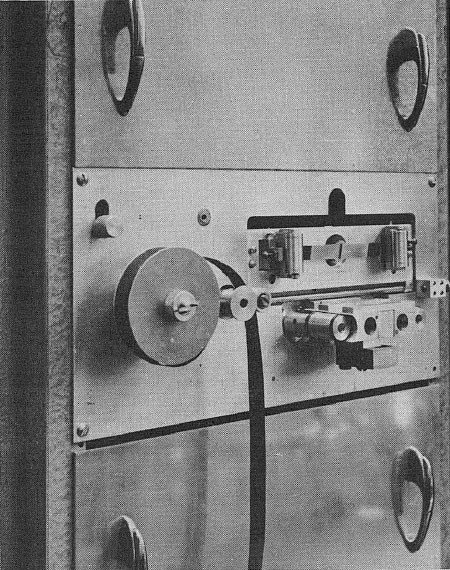
The other technologies referenced in the papers cited in the article dealt with a power transistor switching circuit; a high-speed perforated tape reader; and a transistor video amplifier with 80V output. Although it was all before my time, reading about these foundational electronics technologies was certainly very interesting. By the way, here’s what that “high-speed” perforated tape reader looked like. Doesn’t look all that high-speed to me!

Happy Anniversary to EDN. They’ve sure seen a lot of changes during their 60 years!

Before my time

It was before my time, but I did get a kick out of a greatsputnik recent article by Steve Taranovich on EDN that talked about the technology that was emerging when EDN was first published in 1956 – back in the day when there was no such thing as online, when EDN was called Electrical Design News, and when the industry was “electrical” rather than “electronics.”n his article, Steve recaps some of the overall news events of the 1950’s, then goes through the major electronics technology designs from the year. I’ll be devotingtwo posts to this article. In this first one, we’ll take a look at what happened in the electric-related world, before my time, back in the 1950’s.

Most of us don’t remember life before television. While the technology was invented in the late 1920’s, it wasn’t until the 1950s’ that TV really took off. Now that we had TV, I guess video tape recorders were inevitable. The VTR was developed in 1951, and first sold in 1956. For $50K. I don’t imagine there were too many of those in living rooms recording The Ed Sullivan Show

It wasn’t all TV in that prehistoric decade. People may have been watching, but kids were starting to listen to rock and roll on transistor radios, which came to market in 1954.

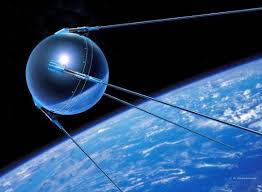
Also in the 1950’s, the first passenger jets were put into service. And in 1953, the first black box flight recorder was put into one of those jets. Sputnik went higher and further than jets. It was launched in 1957, and the space race was on.

The first solar cell came on the scene in 1954, at Bell Labs. And the first computer hard disk came out in 1956. Its name was a mouthful: the IBM 350 Random Access Method of Accounting and Control (RAMAC).

“… a magnetic disk storage device, [RAMAC] was ready in 1956 and held 5 Mb of data and cost $10,000 per megabyte. The device was the size of two refrigerators, weighed in at over a ton, and employed 50 24-inch platters for storage. This device replaced reams of paper that previously tracked inventory, payroll budgets, and other business-related data crammed into file cabinets.” (Source: EDN)

When we look at the power packed into our smartphones, it’s hard to believe that something the size of two fridges, weighing over a ton, was a revolutionary breakthrough.

But that was then, before my time…

“The Secret History of Silicon Valley”: check it out!

I heard recently  from a friend of Critical Link, who sent me a link to a Google Tech Talk video from the way back: 2008.

To me, Steve Blank’s The Secret History of Silicon Valley is really not so much a secret history as it is a forgotten history. Especially for those of us who think that Silicon Valley began with Bill Hewlett and Dave Packard. Or with Steve Jobs. Or Marc Andreasson. Or Sergey Brin.

The preso spends a lot of time on the importance of the R&D done to win World War II as foundational to the emergence of Silicon Valley. An interesting part dealt with how Stanford became an electronics powerhouse. It started when Stanford Professor Fred Termin was called to work at a top secrete radar research lab at Harvard. After the war, he was determined to build Stanford into a center of excellence for electronics. So he went ahead and did it.

I guess you could say that Stanford was already on its way – two of Fermin’s pre-war students were Hewlett and Packard. But it was Fermin’s during the war that really helped make Stanford the engineering powerhouse it became.

Stanford’s engineering excellence has played an outsized role in Silicon Valley, and it’s interesting to see the ties to the research that enabled our bombers to find their targets, even in cloudy weather!

So, if you have an hour of time to listen to Steve Blank’s interesting presentation, I highly recommend it.


Engineers as Dreamers

At the heart of pretty much every engineer I know – and I know a lot of engineers – there’s a tinkerer, an inventor, a dreamer. It’s just the way we think and operate. So I very much enjoyed an article by Cabe Atwell, “10 Universal Projects Every Engineer Dreams Up” that appeared last week in EE Times.  In compiling his roster of projects, Cabe mentions that he’s “never met an engineer that hasn’t mentioned something in this list, so much so that they qualify as cliché projects.” He also notes that these were ideas dreamed about in isolation, pre-Internet. Everyone playing around with an idea was pretty much doing it on their own.

Cliché or not, I have to admit that this engineer has dreamed about some of these DIY projects at some point.

What’s interesting (or depressing, depending on the way you look at it, i.e., if you weren’t the one to realize and commercialize your dream) is that all of these DIY dream projects are now in the market as real, honest to goodness products. As Gabe advises, the fact that products are commercially available should NOT stop you from using them as a “starting point” for having some DIY fun. As he writes, “flash back 10 or 15 years ago, most of these would be near impossible…now they’re easy builds.”

In this spirit, Cabe’s list focuses not on the pricey commercial products available, but on the DIY approaches, sometimes available in kit form,  that will let us tinkerers – or, as we’re now called, makers – come up with our own versions on the cheap.

  • Self-mowing Mower: The product showcased here is a 3D printed robotic lawnmower built by Andreas Haeuser. A Roomba for your yard.
  • Hoverboard: Despite all the problems with hoverboards last year, the hoverboard from Tom’s Workshop, which uses plywood and a leaf blower, looks like fun. I don’t know if I’d go so far to stand on one. But it looks like fun.
  • Mailbox Phone Alert: Sure, if you don’t want to have to be there to see the red flag go up, there are products that alert you when you’re got mail. But Nicole Grimwood has come up with her own version.
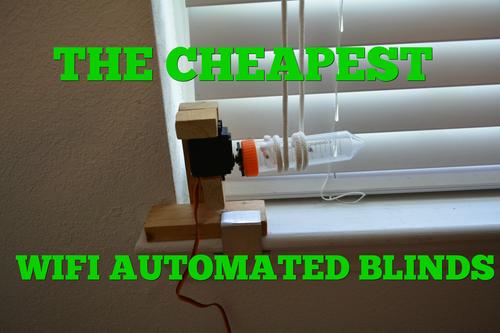
  • Wifi Automated Blinds: Motorized blinds have been around for decades; smart blinds have been around for years. Thus, there are many commercial products out there – and many kits as well. For sheer affordability, Cabe recommends BRUH Automation’s DIY IoT Automated Blinds. Only $15. Warning: the end result isn’t all that attractive, and you probably won’t get permission to use it in your home. Maybe if you’ve got blinds in your garage…autoblinds
  • Automated Hydroponics: Austin Simonson’s platform will let you create the ideal growing environment with sensors that make sure your fruits and veggies get the right amount of light and water. (Keep it legal, please.)
  • Arcade Machine: Bob Clagett’s retro arcade machine may be even more fun than that hoverboard. Oh, for the days when games took up a lot of physical space!
  • Sunrise Alarm Clock: Jason Poel Smith uses small LEDs for his “minimalistic approach” to creating a DIY clock. “Simple, yet ingenious and a great starter project for fledgling electrical engineers and makers alike.”
  • Drink Mixing Robot: This is Cabe Atwell’s own invention: My Drinkmotizer. Among its other clever features is a chaser station “actually controlled by a pressurized paintball tank.”
  • Automatic Laser Level: If you want to make sure that your pictures are evenly hung, and you don’t want to invest in a commercial laser level, you can build your own by following Cripndry’s version, which repurposes parts from an old hard drive.
  • Go-kart: Admit it. You definitely wanted a go-kart when you were a kid. Now you can build your own based on the design from Liquidhandwash. Like a number of the other projects, this one is on Instructables.

For each project on the list, Cabe provides technical detail and links to the source for the instructions.

You know you want to, so why not take some time this weekend to DIY something for yourself.

FPGA Design Techniques

I feel a little bit guilty about throwing something this technical out there in the middle of the summer, but Adam Taylor’s recent article in EE Times, “10 FPGA Design Techniques You Should Know” was just too good to pass up. So here goes a quick summary of what he views as the techniques (laid out in ascending order from the simplest to the most complex) that engineers working with FPGA should have under their belt.

State Machine Design: In order to get FPGA’s to take care of sequence and control-based actions, you need to know about using a Finite State Machine (FSM), which handles the transitions between states. FSM has two main classes: Moore (“state machine outputs are a function only of the current state”) and Mealy (“outputs…are a function of both the current state and one or more inputs”).

Basics of FPGA Math:  FPGA’s are often used to take care of arithmetic operations. Much of the computational work may be off-loaded to DSPs, but effectively using them requires knowledge of fixed-point math.

First In, First Out (FIFO) Buffers: These are useful tools, with a variety of applications, including buffering data “as it passes from one clock domain to another”; for both signal and image processing apps; and to “remove the need to use ping-pong RAMS to transfer data between two elements if one is being read while the other is being written.” Taylor also includes some formulas to help you guard against buffer overflow.

The CORDIC Algorithm:  Remember in high school when the kids who didn’t “get” (or like) math would always be asking what trig was used for. As engineers, we know that there are actually instances where trigonometry comes in handy in real life. The CORDIC (Coordinate Rotation DIgital Computer) is used when you need to implement trig functions within an FPGA.

Metastability Protection:  Sometimes asynchronous signals have to be accommodated. If they’re not, a signal that changed while setup or hold time is occurring could destabilize things. “In order to prevent that, we need to employ a two-stage flip-flop synchronizer to ensure the flip-flop has time to recover.”

Discrete & Fast Fourier Transforms: “There are parameters of a signal that require analysis within the frequency domain to access the information contained within.” Of the methods deployed to convert between the time and frequency domains, when it comes to FPGA apps, the most useful are the Discrete and Fast Fourier Transforms.

Polynomial Approximation:  As an alternative to deploying fixed-point math to take care of complex functions in an FPGA – which is a time-consuming approach, you can plot the function and implement the polynomial trend line in the FPGA,” with the trend line plotted through a math program (Taylor mentions MATLAB) or Excel.

Infinite Impulse Response Filters: The Infinite Impulse Response (IIR) function is used to handle signal processing techniques within an FPGA.  This requires careful design, and to correctly implement an IIR, you need to be grounded in fixed-point FPGA math (see item two on Taylor’s list) and filter theory.

Finite Impulse Response Filters: “Finite Impulse Response (FIR) filters are used when we want to guarantee a stable filter in which the phase of the filter will remain constant.” A common use for a FIR filter is to correct for DAC sinc roll-off.

Image Processing Filters. Adam Taylor is a chief engineer at E2V, so we knew he was going to get around to imaging. And he does, as he completes his list with a discussion of image processing filters.

Even if you wait until September to take a look, you might want to read the very useful full article, which includes a number of illustrations as well as links to further information on all of the techniques. Make sure to go through the comments – lots of additional ideas in there!


.


Mapping out autonomous driving

As someone who has always enjoyed driving, I have mixed emotions about the pending arrival of autonomous cars. On the one hand, I’m intrigued by the use of technology – all those embedded systems! On the other hand, when the day arrives when there’s nothing to do in your car but watch the scenery (or a video), I’ll miss being behind the wheel.

But, as I said, I’m intrigued by the technology that will be deployed, so I was interested to see an article in Tech Times the other day on Civil Maps. They’re a Silicon Valley startup that does 3D-mapping. The company just announced an investment round of $6.6M. Ford is one of the investors.

“Civil Maps is a startup that debuted in California in 2014 and makes use of artificial intelligence (A.I.) and local vehicle-based processing to turn data delivered by the car’s sensors into “meaningful map information.” Such information is paramount to the proper functioning of self-driving cars.” (Source: Tech Times)

Civil Maps relies on camera sensors and high-res laser imaging (LIDAR) to get its data. The data is then crunched, and “the end result is a machine-readable map that ‘requires a fraction of the data storage and transmission for existing technologies.’” AI software is what enables them to keep storage and transmission requirements low.

“Autonomous vehicles require a totally new kind of map,’ says Sravan Puttagunta, the helm of Civil Maps. Puttagunta mentions that the scalable map generation process helps self-driving cars drive just as humans would. This means that the vehicles will be ready to identify “on-road and off-road features,” whether or not they are fully visible or in a perfect state.”

Technology has long since done away with the need for the fold-out maps that everyone got from their gas station and kept in their glove boxes. (You went inside and picked up those maps when – get this – an attendant was filling your car up for you.) And I rather like using a GPS. But I also rather like driving. As I said, while I’m interested in the technology that goes into it, I’m not all that looking forward to self-driving cars.